
DeployR 1.4 is now in general availability. We don’t usually post about a minor release, but the truth is this minor release delivers a whole range of major improvements that the 2Pint Software team is super excited about. Buckle up!
Why are there so many improvements in this release? We launched in the spring, and we already have over a thousand organizations using DeployR Enterprise and Community. That’s a vast range of IT environments and administrators using our tools, giving us invaluable feedback. We’re developing new capabilities in response to real-world requirements and edge cases. Customer feedback keeps shaping what we build, and our product team has been working hard to turn that feedback into real capabilities. Want detail? Head to the release notes. Want highlights? Keep reading…
Download speed improvements
MMS Midway in San Diego, United States and a new partnership with Patch My PC lit a wall of fire under our motivated Product and Development teams, and they responded with seriously fast software. With DeployR 1.4, content delivery and deployments from your server or over the internet can now be up to 10x faster. For DeployR Enterprise customers, we’ve gone even further. We’ve applied our deep expertise in Microsoft peering technology to dramatically improve the speed and scalability of OS deployments. In the Enterprise edition, devices can now peer and share content directly from WinPE, meaning you can start imaging an entire fleet of new devices at once rather than waiting for the first device to finish. We’ve also updated the reboot step to intelligently wait for peers, ensuring active deployments aren’t disrupted.
The result? When a disaster strikes, you don’t have to rebuild devices one by one, you can handle thousands of devices rebuilding simultaneously anytime and anywhere. This is a significant step forward to disaster recovery and business continuity at scale.
Upgraded client-side debugger
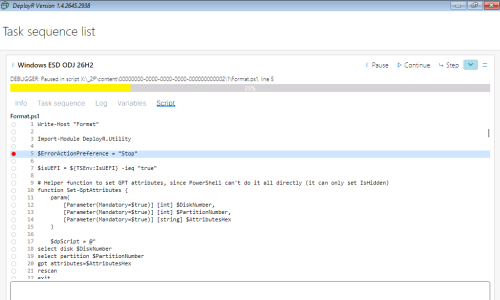
To ensure your deployments run trouble-free, Enterprise customers have a significantly upgraded client-side debugger that provides better visibility into task sequences and PowerShell scripts. Troubleshooting a new step no longer means watching the whole sequence. Set a breakpoint, walk away, and come back when it gets there. Modifying and troubleshooting default task sequences is easier with the improved debugger, and it gets you from development to production faster.
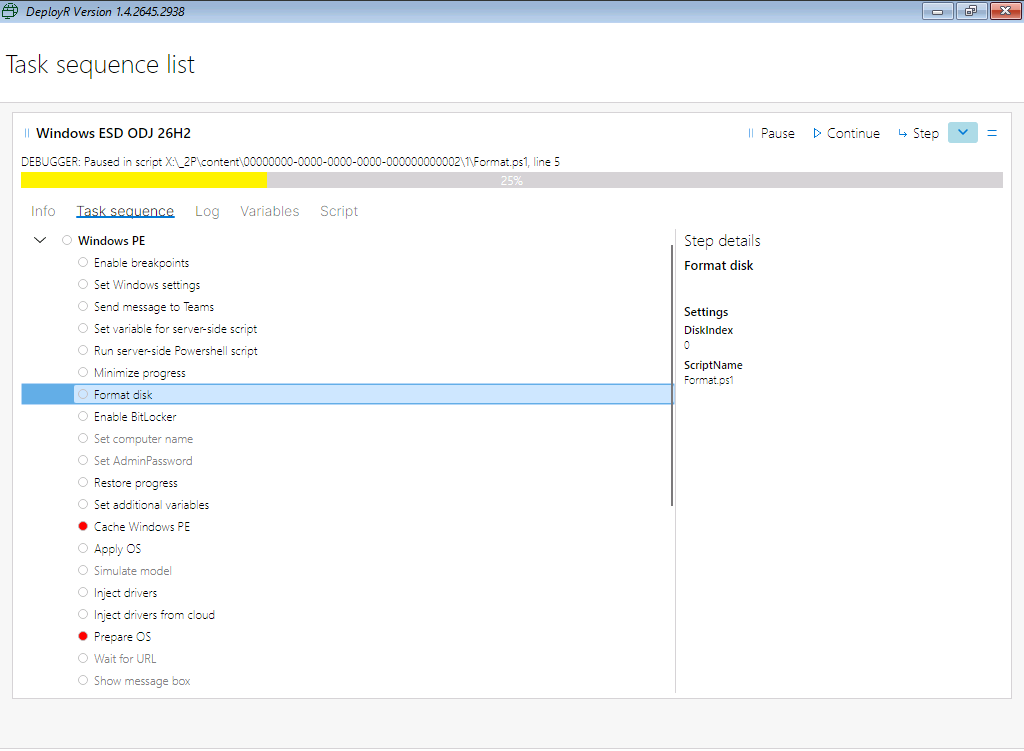
DeployR client-side debugger with task sequence breakpoints set
Self-updating media
One of our smartest and most exciting DeployR Enterprise upgrades is the introduction of self-updating media which turns a USB stick into a fully provisioned BranchCache-enabled peer. As it’s downloaded, content is updated and cached so it’s available for subsequent deployments. That includes Windows PE boot images, which are regenerated automatically when needed. For better performance, content that needs updating is checked against the cache so that only the updated blocks are transferred – not the entire file. Bottom line? Faster network deployments and less management of flash media. You get the latest content from the server if any changes are made, without downloading anything that’s already on the USB stick. And those efficiencies flow downstream when the USB stick shares content with other devices via peering.
This feature is particularly strong anywhere you have remote, distributed, bandwidth-constrained, or occasionally connected devices and need a reliable way to deploy or recover them locally. The clever part is that the USB isn’t really “installation media” anymore. It becomes a portable, self-refreshing deployment and caching node. See below for some of the strongest use cases:
| Use case | Why it fits |
|---|---|
| Bank ATMs | ATMs are geographically distributed and often have constrained connectivity. A technician can arrive with current media, rebuild an ATM locally, and avoid pulling the entire Windows image over the WAN. |
| Retail stores / POS terminals | Think supermarkets, fashion chains, restaurants and gas stations with hundreds or thousands of locations. One USB could seed a store and then peer content locally to other POS or back-office devices. |
| Bank branches | Branch PCs, kiosks and specialist banking terminals can be rebuilt locally without repeatedly downloading large OS images across the branch WAN. |
| Factories / manufacturing plants | Production PCs, operator terminals and industrial Windows devices often sit on tightly controlled networks where Internet or datacenter connectivity is limited. |
| Warehouses and distribution centres | Great for handheld-management stations, packing PCs, kiosks and other Windows endpoints where downtime directly affects operations. |
| Ships / offshore platforms | A particularly compelling scenario because bandwidth can be expensive, slow, or intermittent. The media can be updated when connectivity is available and then act as a local content source. |
| Mining sites / oil and gas | Similar to offshore platforms, remote facilities may have dozens or hundreds of endpoints, but limited WAN capacity. |
| Military / defence environments | Useful for disconnected or highly controlled networks where deployment content needs to be physically brought to a location and then distributed locally. |
| Hospitals / healthcare sites | Useful for recovery or rapid rebuild of clinical workstations, carts and other Windows endpoints, particularly at satellite locations. |
| Hotels | Hotel chains have highly distributed properties with front-desk, back-office, and operational PCs. A USB can provide an easy local recovery/deployment mechanism without needing IT infrastructure at every property. |
| Airports / airlines | Check-in desks, kiosks, gate PCs and operational workstations are distributed environments where rapid recovery matters and downloading a full image repeatedly is inefficient. |
| Construction sites | Temporary sites often have poor connectivity but still need standardized Windows devices. USB becomes an easy way to carry the deployment infrastructure to the site. |
| Remote offices / branches | A small office doesn't need its own deployment server because the media effectively brings deployment capability with it. With a fully loaded server costing $100,000 per year, this is a great enterprise cost reduction use case combined with peer-to-peer technologies. |
| Schools / universities | Useful for labs and campuses where large numbers of PCs need rebuilding, particularly during holiday refresh cycles. |
| Disaster recovery / ransomware recovery | IT can arrive with known deployment media, boot machines and rapidly rebuild an environment while minimizing dependency on infrastructure that may itself be unavailable. |
StifleR dashboard monitoring of deployment progress
DeployR integrates with the StifleR platform for real-time administration, monitoring, and reporting. This enables admins to monitor running deployments via the dashboard, review progress, check logs, and even look over the current task sequence variables. There’s detailed reporting on downloads, including content name and type, local path, and priority. For granular log viewing, we’ve added a CMTrace-style log viewer for DeployR sequences.
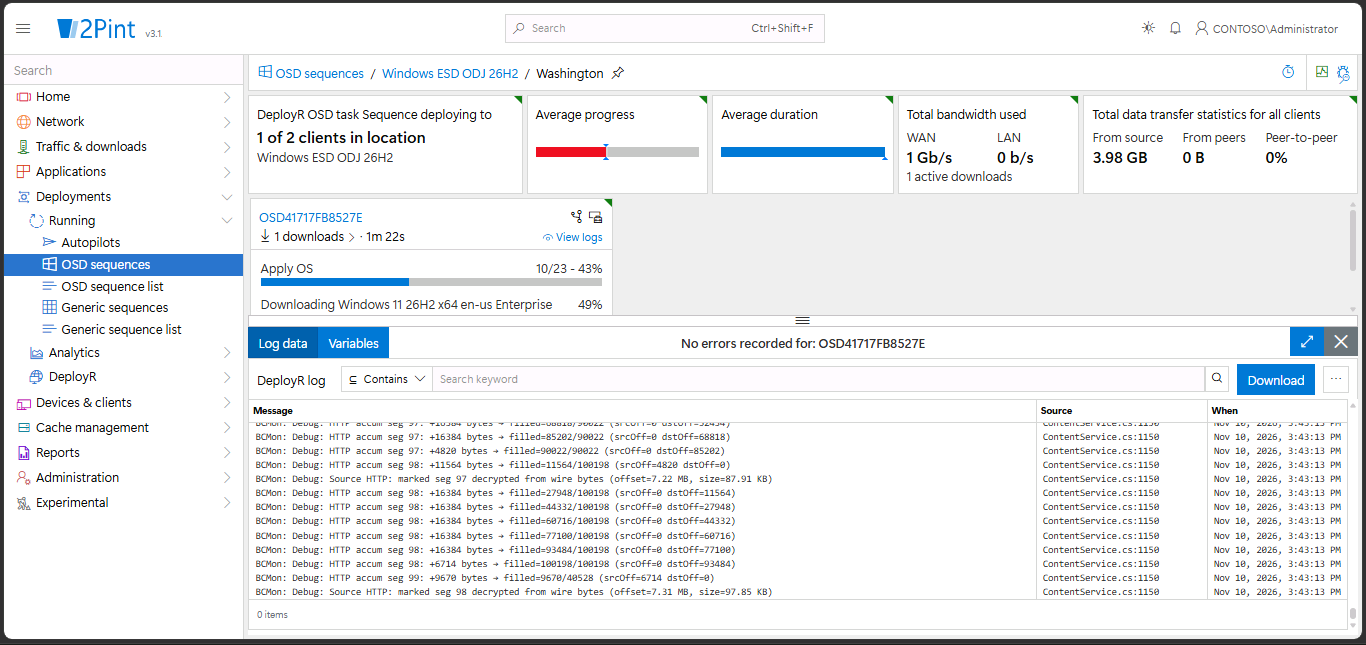
OSD card in StifleR displaying deployment status.
No matter how your deployments are running, this gives you visibility from the individual device right through to the executive overview, providing a management a view of deployment success and failure trends, making it easier to understand overall deployment health and identify recurring issues.
More new features
There are lots more new goodies to support your deployment workflows. Admins can now hide the tools and debugger behind a passcode so end users and techs don’t break things or see what they shouldn’t. Windows images can be pulled directly from the Microsoft CDN with cloud OS import so you can add them as content items. OEM driver packs can be downloaded and turned into local content items too, enabling faster client downloads and better control over driver pack versions. A new template for Windows refresh scenarios starts in an existing Windows 10 or 11 installation, wipes it, and installs a new OS on the device while managing the user data with USMT. Another template supports bare metal deployment from FFU images. Show DeployR users a customized web page before the task sequence starts and host a form to capture user input as task sequence variables.
Ready to take advantage of all DeployR 1.4 has to offer? If you’re upgrading, head over to the releases site to grab what you need (and be sure to read Before you upgrade). To download a trial, visit the DeployR Enterprise or DeployR Community product pages.
Top Posts
DeployR 1.4 released for general availability
2Pint Software and Patch My PC partnership: Simplifying Windows deployment and application management
2Pint Software and Omnissa partnership: Closing the gaps in OS deployment, bare-metal imaging, bandwidth optimization, and endpoint recovery
By Michelle Hammarskjöld

By Andreas Hammarskjöld
By Ranjith Lewis

By David Meurer